Saturday, April 25, 2020

How to Handle Alert PopUp In Selenium

package com.seleniumpractice;

import java.util.concurrent.TimeUnit;

import org.openqa.selenium.Alert;
import org.openqa.selenium.By;
import org.openqa.selenium.WebDriver;
import org.openqa.selenium.WebElement;
import org.openqa.selenium.chrome.ChromeDriver;
import org.openqa.selenium.interactions.Actions;

public class AltertDemo {

public static void main(String[] args) throws InterruptedException {
System.setProperty("webdriver.chrome.driver","C:\\Users\\admin\\Desktop\\Selenium_software\\chromedriver.exe");
WebDriver driver=new ChromeDriver();
driver.get("https://artoftesting.com/sampleSiteForSelenium");
driver.manage().window().maximize();
driver.manage().timeouts().implicitlyWait(20,TimeUnit.SECONDS);
WebElement ele=driver.findElement(By.id("dblClkBtn"));
Actions act=new Actions(driver);
act.doubleClick(ele).perform();
Alert alt=driver.switchTo().alert();
Thread.sleep(2000);
String actualstr=alt.getText();
System.out.println("String value..."+actualstr);
String expStr="Hi! Art Of Testing, Here!";
if(actualstr.equals(expStr)){
alt.accept();
System.out.println("Test case pased");
}
else {
System.out.println("Test case failed");
}
//alt.accept();
//driver.close();

}

}
========================================================================

How to Handle Dynamic Frame in Selenium WebDrier

package com.seleniumpract;

import java.sql.Driver;
import java.util.concurrent.TimeUnit;

import org.openqa.selenium.By;
import org.openqa.selenium.WebDriver;
import org.openqa.selenium.chrome.ChromeDriver;

public class PayTtmDemo {

public static void main(String[] args) {
System.setProperty("webdriver.chrome.driver","D:\\Ingenious_TechHub_Teaching\\Ingenious_Selenium\\driver\\chromedriver.exe");
WebDriver driver=new ChromeDriver();
driver.get("https://paytm.com/");
driver.manage().window().maximize();
driver.manage().timeouts().implicitlyWait(10,TimeUnit.SECONDS);
driver.findElement(By.xpath("//div[contains(text(),'Log In/Sign Up')]")).click();
int frameSize=driver.findElements(By.tagName("iframe")).size();
System.out.println("frameSize.."+frameSize);
for(int i=0;i<frameSize;i++){
driver.switchTo().frame(i);

if(driver.findElements(By.xpath("//span[contains(text(),'Open Paytm ')]")).size()!=0){
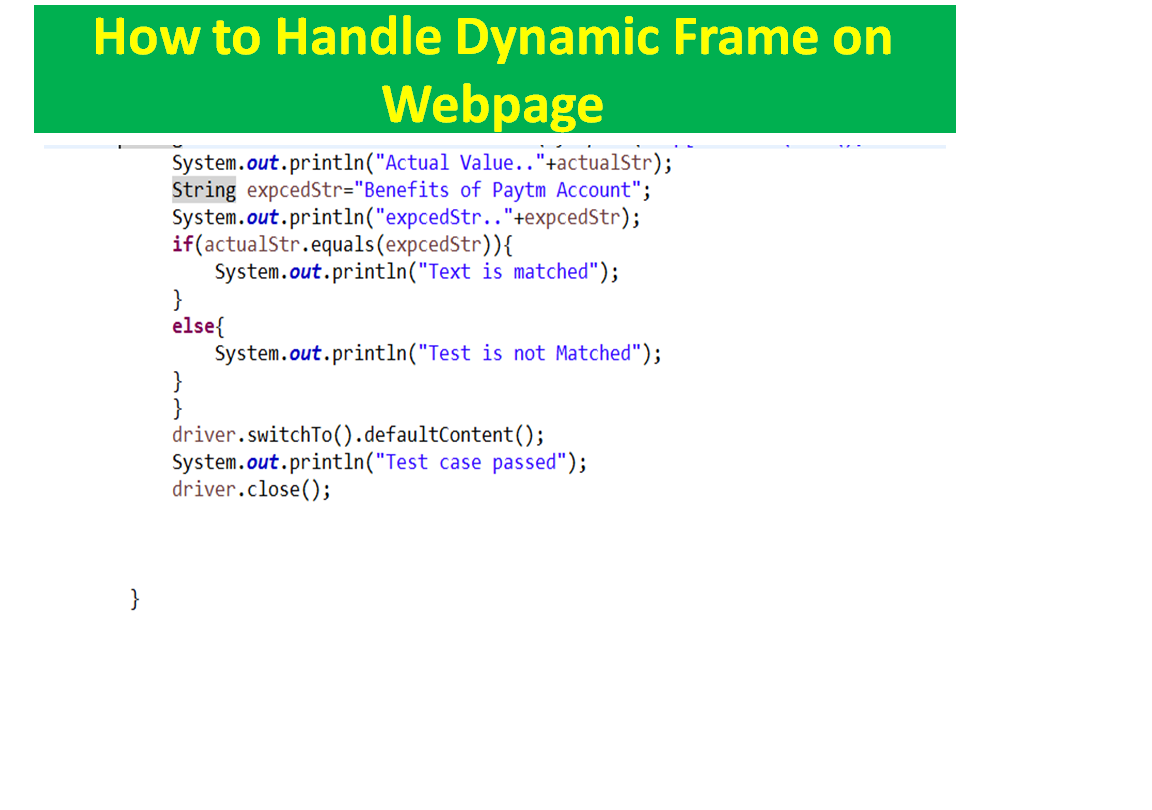
       String actualStr= driver.findElement(By.xpath("//p[contains(text(),'Benefits of Paytm Account')]")).getText();
System.out.println("Actual Value.."+actualStr);
String expcedStr="Benefits of Paytm Account";
System.out.println("expcedStr.."+expcedStr);
if(actualStr.equals(expcedStr)){
System.out.println("Text is matched");
}
else{
System.out.println("Test is not Matched");
}
}
driver.switchTo().defaultContent();
System.out.println("Test case passed");
driver.close();


}


}

}
========================================================================

Friday, March 27, 2020

How to handle Radio button and Checkbox 


import org.openqa.selenium.WebDriver;
import org.openqa.selenium.WebElement;
import org.openqa.selenium.chrome.ChromeDriver;

public class VerifyCheckbox {

public static void main(String[] args) {
System.setProperty("webdriver.chrome.driver","F:\\chromedriver.exe");
WebDriver driver=new ChromeDriver();
driver.get("file:///D:/Ingenious_TechHub_Teaching/Ingenious_Selenium/Htmldoc/checkbox.html");
    driver.manage().window().maximize();
    WebElement chbox=driver.findElement(By.xpath("//input[@id='vehicle1']"));
    chbox.click();
   boolean checkboxsle= chbox.isSelected();
   if(checkboxsle){
   System.out.println("checkboxsle...selected" + checkboxsle);
   }
   else{
   System.out.println("checkboxsle...not selected" + checkboxsle);
   }


}

}


=======================================================================
import org.openqa.selenium.WebElement;
import org.openqa.selenium.chrome.ChromeDriver;

public class verifyRadiobutton {

public static void main(String[] args) {
System.setProperty("webdriver.chrome.driver","F:\\chromedriver.exe");
WebDriver driver=new ChromeDriver();
driver.get("file:///D:/Ingenious_TechHub_Teaching/Ingenious_Selenium/Htmldoc/radio.html");
driver.manage().window().maximize();
WebElement radioele= driver.findElement(By.xpath("//input[@value='male']"));
radioele.click();
boolean radielesel= radioele.isSelected();
if(radielesel){
System.out.println("Male radio button is selected");
}
else{
System.out.println("Male radio button is not selected");
}

}

}
========================================================================
package com.seleniumpract;

import org.openqa.selenium.By;
import org.openqa.selenium.WebDriver;
import org.openqa.selenium.WebElement;
import org.openqa.selenium.chrome.ChromeDriver;

public class VerifyCheckbox {

public static void main(String[] args) {
System.setProperty("webdriver.chrome.driver","F:\\chromedriver.exe");
WebDriver driver=new ChromeDriver();
driver.get("file:///D:/Ingenious_TechHub_Teaching/Ingenious_Selenium/Htmldoc/checkbox.html");
    driver.manage().window().maximize();
    WebElement chbox=driver.findElement(By.xpath("//input[@id='vehicle1']"));
    chbox.click();
   boolean checkboxsle= chbox.isSelected();
   if(checkboxsle){
   System.out.println("checkboxsle...selected" + checkboxsle);
   }
   else{
   System.out.println("checkboxsle...not selected" + checkboxsle);
   }


}

}


How to automate checkbox

Show Checkboxes


Q) How To Find Duplicate Characters In A String In Java?

Step1:- Creating a HashMap containing char as key and it's occurrences as value. Step2:- Converting given string to char array. Step3:- ...